
 Chinese
LED light strips, with their flexible installation methods and rich lighting effects, are widely used in various scenarios such as commercial lighting, home decoration, and small store decoration. Among them, SPI light strips (such as WS2811, WS2812B, WS2815, UCS1903 models) with pixel-level control advantages have become the preferred choice for personalized decoration. However, in actual use, many users encounter problems with SPI light strips not being controlled – such as erratic light flickering, color deviations, inability to respond to controller instructions, and failure of local light strips. This not only affects the user experience but also may delay the decoration progress.
When many users encounter such problems, they tend to fall into the trap of “blindly replacing the light strips and controllers”, which not only increases costs but also fails to solve the problems accurately. In fact, the uncontrollable issue of SPI light strips mainly lies in the four major aspects of “wiring, equipment matching, signal interference, and parameter setting”. As long as one follows the logic of “first identifying the phenomenon, then locating the cause, and finally solving it precisely”, it is possible to efficiently troubleshoot. Most of the problems can be handled without professional skills and by oneself. This article will detail the troubleshooting steps, common causes, and solutions for the uncontrollable issue of SPI light strips, along with a clear outline, to help you quickly solve various control problems.
1. First, clarify the core: The uncontrolled core feature of the SPI light strip
1.1 Uncontrolled core performance (quickly distinguishing “faults” from “operator errors”)
●Core performance issues: Fluctuating lights, disordered colors, inability to switch pixel-level effects (such as flowing or chasing), no response from local/overall light strips, abnormal brightness (either too bright or too dim)
●Precautions for inspection: First, perform power-off operation to avoid the risk of electric shock. At the same time, confirm that the equipment (light strips, controller, power supply) is powered on normally, and rule out basic errors such as “not powered on” or “loose plug”.
●The main causes: unstable power supply, incorrect wiring, signal interference, insufficient device compatibility, and damaged IC chips. These five factors account for over 95% of the total.
1.2 Core Characteristics of SPI Light Strip (Accurately Identifying the Root Cause of Faults)
●Control features: Focuses on pixel-level control, enabling independent control of individual light bulbs, suitable for personalized decoration scenarios (such as homes, small stores, and popular打卡spots, etc.)
●Transmission characteristics: The signal is transmitted in a “single-line series” manner, which is susceptible to the wiring direction and transmission distance. This is one of the main reasons why the SPI light strips are uncontrollable.
●Common model differences: In 3-wire system (WS2811, WS2812B), there is no continuous transmission function upon interruption. Damage to a single LED or a certain section may cause the subsequent light strip to lose control; In 4-wire system (WS2815), it has the continuous transmission function upon interruption, which can effectively avoid such problems.
II. General Troubleshooting Steps for SPI Light Strips
No matter what kind of abnormal situation occurs with the SPI light strip, first follow the following general steps to troubleshoot. This can quickly resolve 80% of the basic problems, avoiding the need for random disassembly and replacement of equipment, and saving time and costs.
2.1 Step 1: Power-off inspection, to identify and resolve basic power supply issues
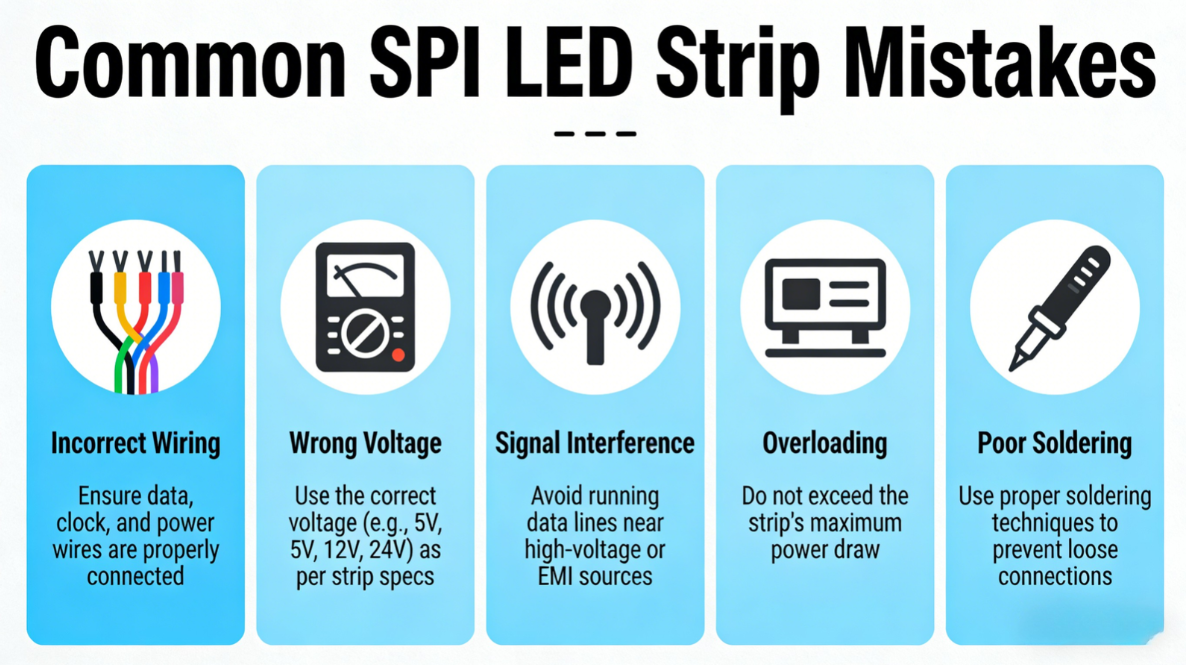
●- Check the power adapter: Ensure that the power specification matches the SPI light strip (most SPI light strips are 12V, while some high-power models are 24V). Avoid using a “low-power power supply for a high-power light strip” which may result in insufficient power supply. Use a multimeter to measure the output voltage of the power supply. If the voltage fluctuates greatly or there is no output, it indicates that the power supply is damaged and a power supply of the same specification needs to be replaced (the power supply’s power should be 20% higher than the total power of the light strip and leave some redundancy).
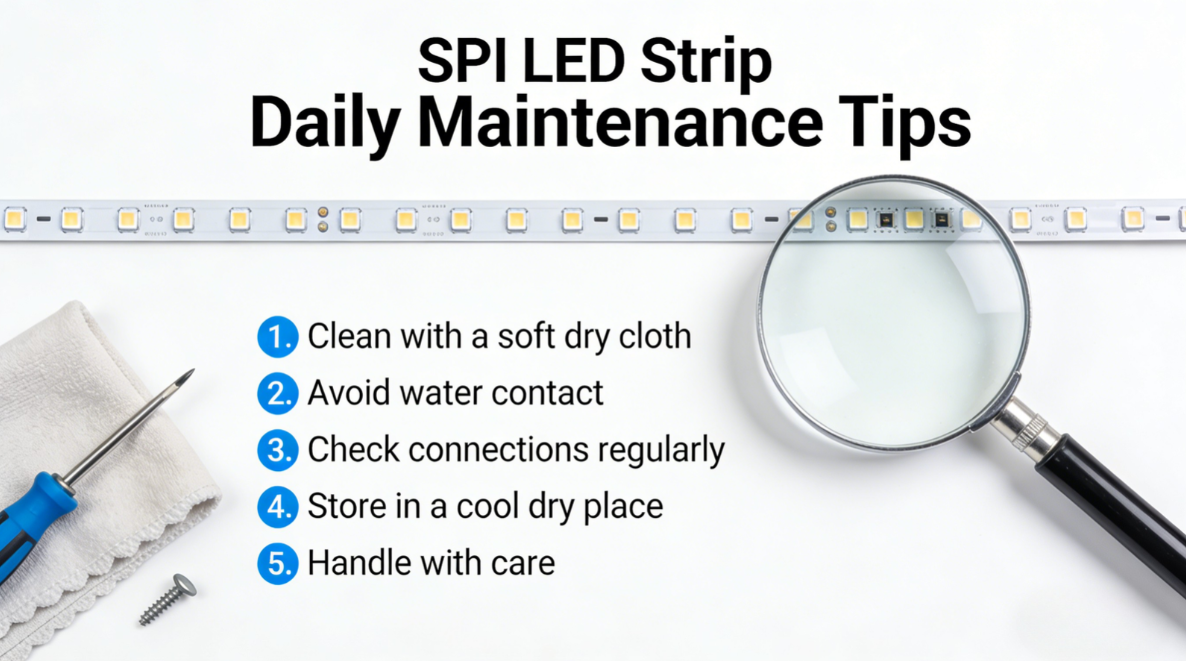
●- Check the power connection: Ensure that the positive and negative terminals (V+ and GND) of the power supply are securely connected to the controller and the light strips, without any looseness, oxidation, or detachment. If the connection points are blackened or have a burnt smell, they need to be re-welded or replaced with new connectors.
●- Troubleshooting overloading issues: If the length of a single SPI light strip exceeds 5 meters and “power supply at both ends” is not adopted, it will result in insufficient voltage at the end, causing flickering and instability. In such cases, the light strip needs to be split or additional power supply points need to be added.
2.2 Step 2: Check the wiring and eliminate the core issue of “wiring error”
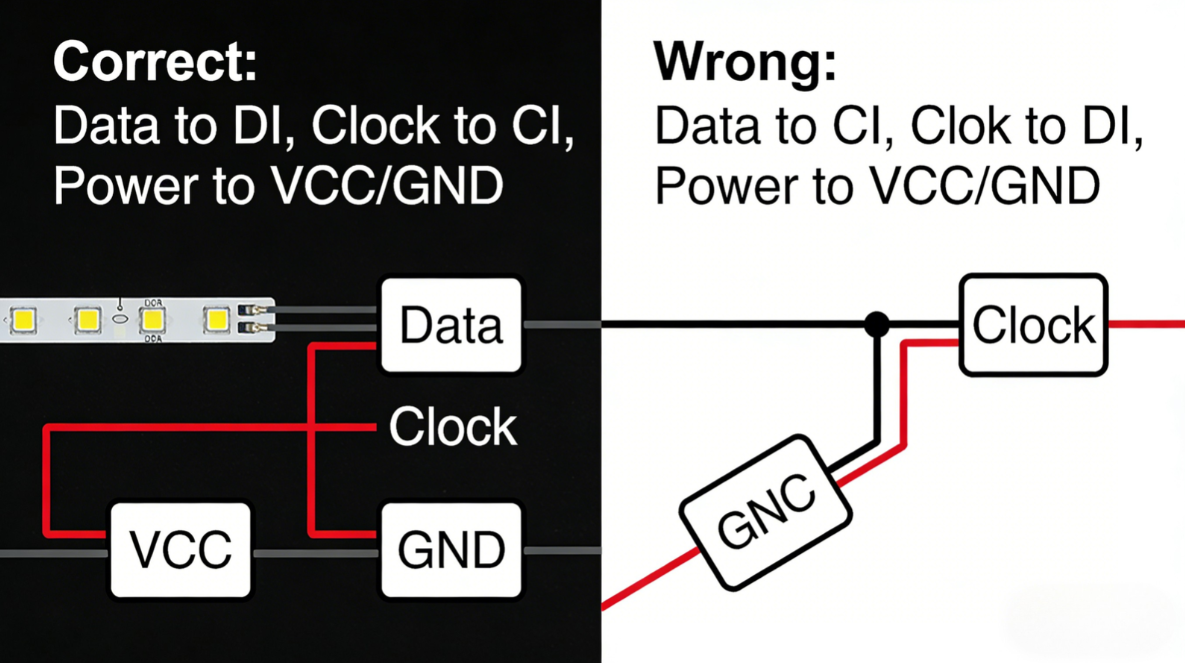
●- Ensure correct wiring sequence: The SPI light strip must strictly distinguish between V+ (positive pole), GND (negative pole), and DAT (signal line). Reversing the wiring sequence will directly result in the light strip not responding or going out of control. It is necessary to check the wiring according to the light strip manual.
●Check the wiring direction: The SPI light strip signal has a definite direction. It should be connected to the controller from the DIN (signal input) end, and then extended from the DOUT (signal output) end to the next section of the light strip. Reversing the connection will cause the entire light strip to lose control.
●- Locate the connection break point: Use the buzzer function of the multimeter to test the continuity of the circuit. If a certain section of the circuit is not conducting, it indicates an internal break or a loose solder point. In this case, the connection needs to be re-welded or the connecting wire replaced. For waterproof SPI light strips, pay attention to the sealing of the connection points to prevent water ingress and short circuit. After welding, apply hot melt adhesive to prevent moisture.
2.3 Step 3: Check the controller and confirm that “instruction transmission” is normal
●Controller reset test: Disconnect the controller from power for 3 to 5 minutes, then reconnect it. This will clear any previous erroneous instructions. If the controller returns to normal after the reset, it indicates that the malfunction is caused by a disorder in the controller’s program.
●Controller compatibility check: Ensure that the controller is compatible with the SPI light strip IC model (for example, the WS2812B light strip requires a SPI controller that supports this model), to avoid the situation where “using a DMX controller to control the SPI light strip” leads to no response; In engineering scenarios, it is necessary to connect to the DMX console through a DMX-SPI decoder.
●Controller fault detection: Replace the test with a backup SPI controller. If the light strip functions normally after the replacement, it indicates that the original controller is damaged (such as a fault at the signal output port or program corruption), and a controller of the same model needs to be replaced. Observe the indicator lights of the controller. A constantly on green light indicates normal operation, while a flashing light indicates abnormal data transmission.
2.4 Step 4: Identify and eliminate signal interference, and resolve the “unstable” issue
●- Reduce environmental interference: Avoid laying the SPI light strip connection lines in parallel with strong electrical lines (220V), with a spacing of no less than 30cm to prevent strong electrical interference from affecting signal transmission; In outdoor scenarios, ensure proper line shielding to avoid signal abnormalities caused by rain and dust.
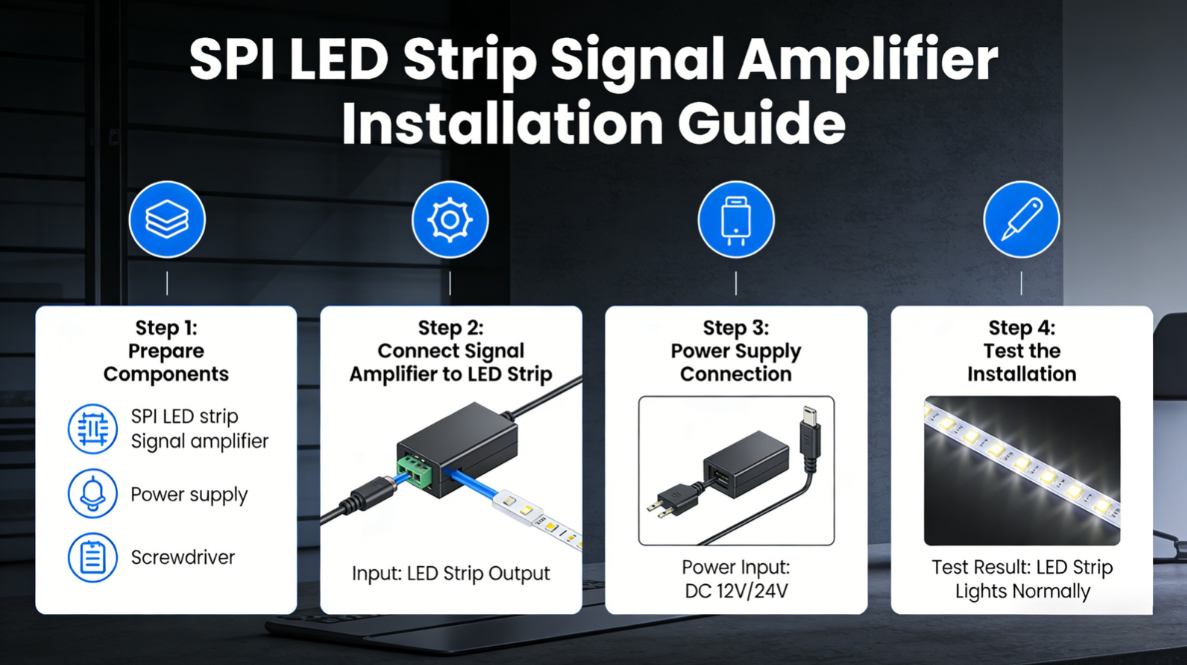
●- Install signal enhancement equipment: If the length of a single SPI light strip exceeds 5 meters, an SPI signal amplifier must be installed to prevent loss of signal and resulting instability; if the length exceeds 10 meters, it is recommended to split the light strip and power it at both ends, and at the same time install an amplifier.
●- Standard wiring: The DAT signal lines should be wired separately to avoid entanglement with the V+ and GND lines, thereby reducing signal interference; it is advisable to choose shielded signal lines to further enhance the anti-interference capability.
2.5 Step 5: Segment testing, identify “local fault” points
●Segmented troubleshooting method: Divide the SPI light strips into sections of 5 meters each, and connect each section to the controller for testing. This will quickly identify the area where the system is out of control. If a certain section is out of control, it indicates that the IC chip of that section’s light strip is damaged or there is a break in the circuit.
●Damage handling method: Cut off the damaged part, re-join the intact part at the designated cutting points, fix it with a special connector or welding, pay attention to the positive and negative poles and the wire sequence; 4-wire SPI light strips (such as WS2815) have the function of continuous transmission at breakpoints. If a single light bulb is damaged, it can be skipped without affecting the normal operation of the subsequent light strip.
III. Special Fault Diagnosis for SPI Light Strip
The SPI light strip is not controlled. Apart from the aforementioned general issues, it is mostly related to “IC chips, signal transmission, and parameter settings”. Here are the common specific faults and solutions. Beginners can directly follow the instructions for operation.
3.1 Common Specific Faults and Solutions
●- Fault 1: The entire light strip is not lit up, but the indicator light of the controller is normal → Check if the DAT signal line is connected in the wrong direction or is loose, or if the DIN terminal is connected incorrectly. Reconnect the signal line and ensure the wiring direction is correct.
●- Fault 2: The lights flicker, the colors are disordered, and there is no regular pattern of change → Check the compatibility between the SPI controller and the light strip IC model, or there may be signal interference; Install a signal amplifier, keep the signal lines away from high-voltage circuits, and avoid twisting.
●- Fault 3: Partial light strips are not lit, while the rest are normal → The IC chip of this section of the light strip has burned out or there is a break in the circuit. Cut off the damaged part, connect it with a dedicated connector, and pay attention to the positive and negative poles and wire sequence during soldering. For waterproof models, the interface needs to be resealed.
●- Fault 4: Unable to achieve pixel-level control (such as failure of water flow and chasing effects) → Incorrect parameter settings of the controller. Re-adjust the controller, select the corresponding IC model’s control program, and ensure that the number of pixels matches the actual length of the light strip.
●- Fault 5: The brightness of the light strips is abnormal, flickering on and off → The power supply is unstable or overloaded. Replace the power supply with one that has sufficient power, split the excessively long light strips, and add more power supply points.
3.2 Precautions for Checking SPI Light Strip
●Avoid excessive bending of the light strips to prevent internal wiring from breaking and IC chips from falling off. The bending radius during installation should be no less than 5 cm.
●The length of each SPI light strip is not recommended to exceed 10 meters. If it exceeds this length, it should be split or powered at both ends, and a signal amplifier should also be installed.
●When wiring, the DAT signal line should be routed separately to avoid being tangled with the V+ and GND lines, thereby reducing signal interference.
●Choosing a 4-wire SPI light strip (such as WS2815) can effectively reduce the probability of “the entire strip going out of control due to the failure of a single light bulb”, making it suitable for scenarios with high requirements for stability.
●During the welding process, the temperature should not be too high to prevent the IC chips from being burned. The welding time should be controlled within 2 to 3 seconds.
The SPI light strip is not controlled. The core issue is not related to “product quality”, but rather is caused by details such as “installation, equipment matching, signal transmission”, etc. As long as you follow the logic of “5-step general troubleshooting, targeted solutions for specific problems”, you can quickly locate the fault. Most problems can be self-diagnosed and resolved without the need for professional technicians.
If the above troubleshooting steps fail to solve the uncontrolled problem, it may be a quality issue with the light strip or the controller itself (such as batch damage of IC chips, controller program failure). In this case, it is recommended to contact professional technicians for testing or replace with products from a reputable manufacturer.
As a professional LED light strip manufacturer, our SPI light strips (such as WS2811, WS2812B, WS2815, etc.) have all undergone strict quality inspections and are equipped with complete installation guidelines and technical support. From product selection, installation guidance to fault troubleshooting, we provide professional services throughout the process, effectively reducing the problems of uncontrolled operation during use and safeguarding your lighting decoration project. If you encounter any issues during use, you can contact our technical team at any time to obtain one-on-one solutions.
Facebook:https://www.facebook.com/profile.php?id=100089993887545
Instagram:https://www.instagram.com/mx.lighting.factory/
YouTube:https://www.youtube.com/channel/UCMGxjM8gU0IOchPdYJ9Qt_w/featured
LinkedIn:https://www.linkedin.com/company/mingxue/
Post time: Mar-06-2026